Excel precaution to protect your computer from potential viruses, all files are protected through the opening show. By using Protected View, you can read the file and see its contents at the same time minimizing the risk of becoming infected.
If you download files from the Internet or receive e-mail and whether you download from other potentially unsafe locations, such files can contain viruses, worms or other types of malware that can eventually infect your computer.
It is possible that you receive the correct e-mail from a known sender, file to be completely correct and that your Excel (or Word) signals the technical error and “stuck” with the work, a usuštini be only files recognized as “suspicious”.
This problem is solved by switching off the protected mode display.
How to disable Protected View
It is recommended that you talk with the administrator or a person who cares about bbezbednosti your computer before you change the setting Protected View.
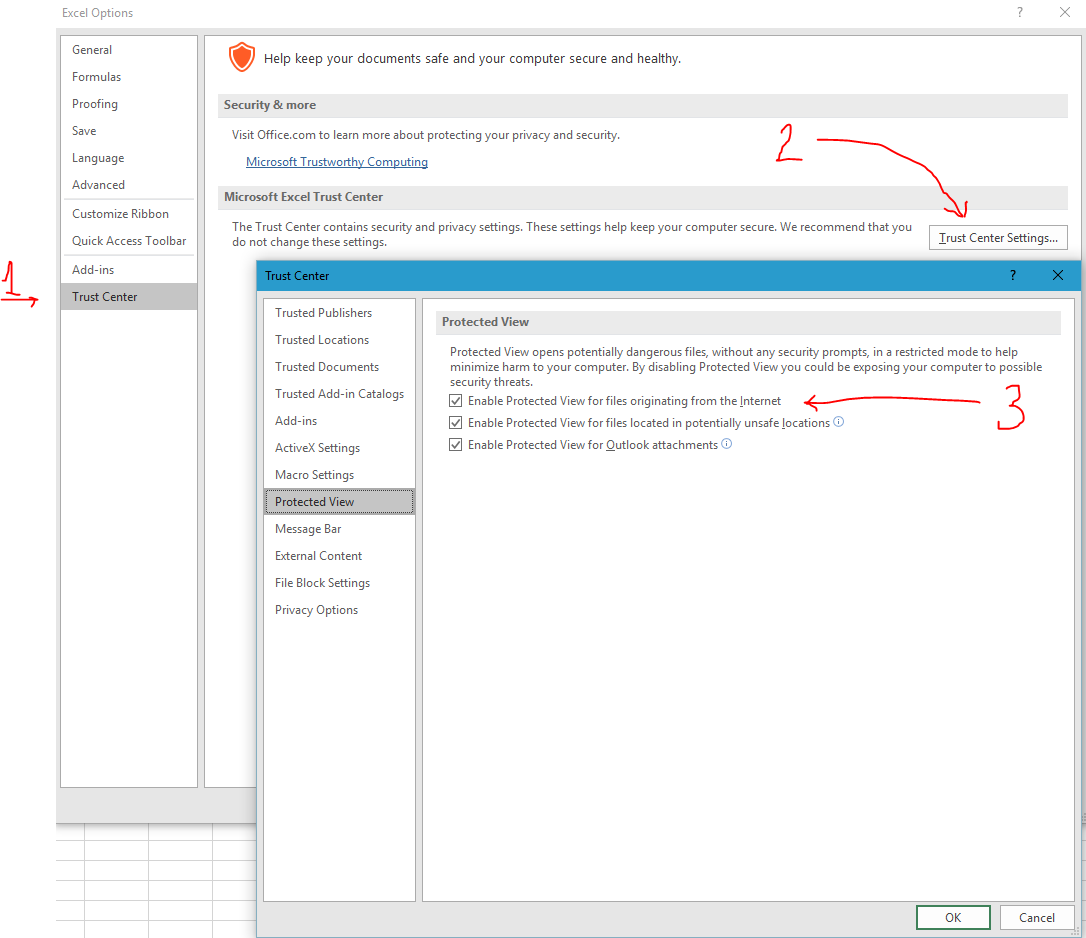
Not bad to you on check and rewrite the file for you. If you have rights to change the settings excel-and you can perform the following three steps:
- Choose File> Option> Trust Center.
- Select Trust Center Settings.
- Make the desired selections, or turn off Enable Protected View for files.