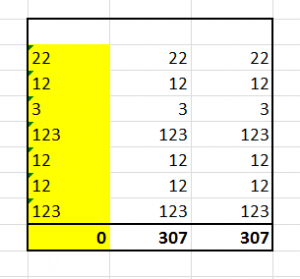
U svakoj ćeliji tabele gde je broj Excel će signalizirati grešku malim zelenim trouglom u gornjem levom ćošku. Ako kliknemo na upozorenje dobija se sledeći meni kao na sledećoj slici.
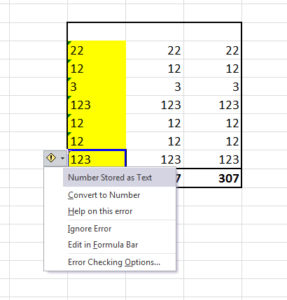
Excel je detektovao da je u ćeliji broj u formiatu teksta. Izborom na Convert to Number opcije ispraviće se format.
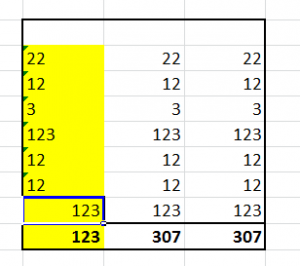
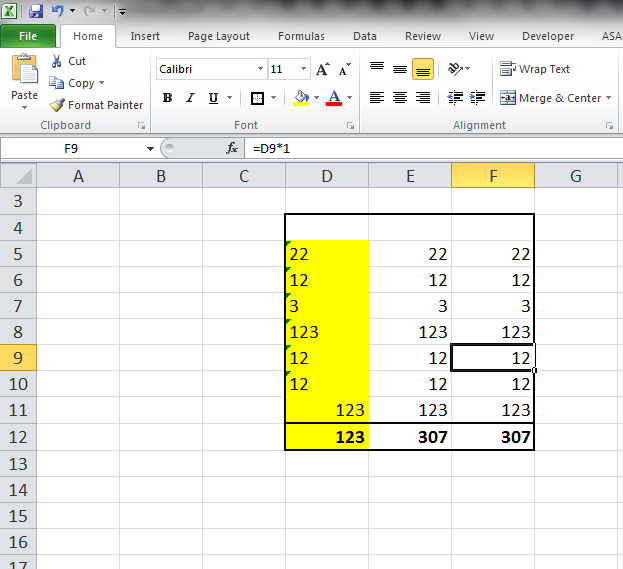
Da ne bi to radili nad svakom ćelijom možemo iskoristiti funkciju Value(x) ka u drugoj koloni sledećoj slici.
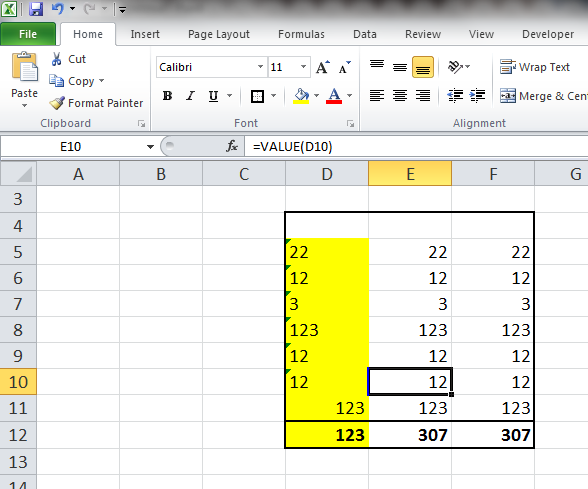
Ili još jednostavnije svaku ćeliju pomnožiti sa brojem 1 kao u koloni tri na sledećoj slici.
cifre kao brojevi
Ne mali broj puta u tabeli nam se ne pojave cifre kao brojevi sa kojima možemo obaviti neku matematičku operaciju ili funkciju. Takva situacija se pojavljuje kada uvezemo ili kopiramo podatke iz teksta. U sledećem primeru vidi se da u poslednjem redu suma prve kolone je nula, jer cifre nisu brojevi nego tekst.[:en]Not a few times in the table we have a numbers with which we can not do any mathematical operation or function. This situation occurs when you import or copy the data from the text. In the following example can be seen that in the last row of the first column is zero, as the figures are numbers rather than text.
In each cell of the table where the number of Excel will signal the error small green triangle in the upper left corner. If you click on the warning we get the following menu as shown below.
Excel has detected that the content in a cell saved in text format. Selecting option Convert to Number to correct an format.
If you don’t wont to do this in every cell you can use the function value (x) like presented in second column of the next picture.
Or even simpler each cell multiplied with the number 1 as in column three in the following figure.
[:]